Prerequisites
Every embeddable web component reads events through a short-lived JWT called an embed token. Your backend mints it; your frontend hands it to the component; the component talks directly to Everscribe with the token as a bearer credential. Your project API key never reaches the browser.
This page is everything you need to know about that token before you touch the component itself.
The flow
Your backend                    Browser                     Everscribe
     |                             |                              |
     |  (1) request to load page   |                              |
     |<----------------------------|                              |
     |                             |                              |
     |  (2) mint token, sign w/    |                              |
     |      project embed secret   |                              |
     |                             |                              |
     |  (3) JWT --------------->   |                              |
     |                             |   (4) GET /v1/embed/events   |
     |                             |       Authorization: Bearer  |
     |                             |       <jwt>                  |
     |                             |   (5) <-------- events ----  |
     |                             |                              |
The token's claims are signed with a project-specific embed secret ( separate from your project API key ). Everscribe verifies the signature, applies the token's filters, and returns only events the token's claims allow.
Single-tenant minting
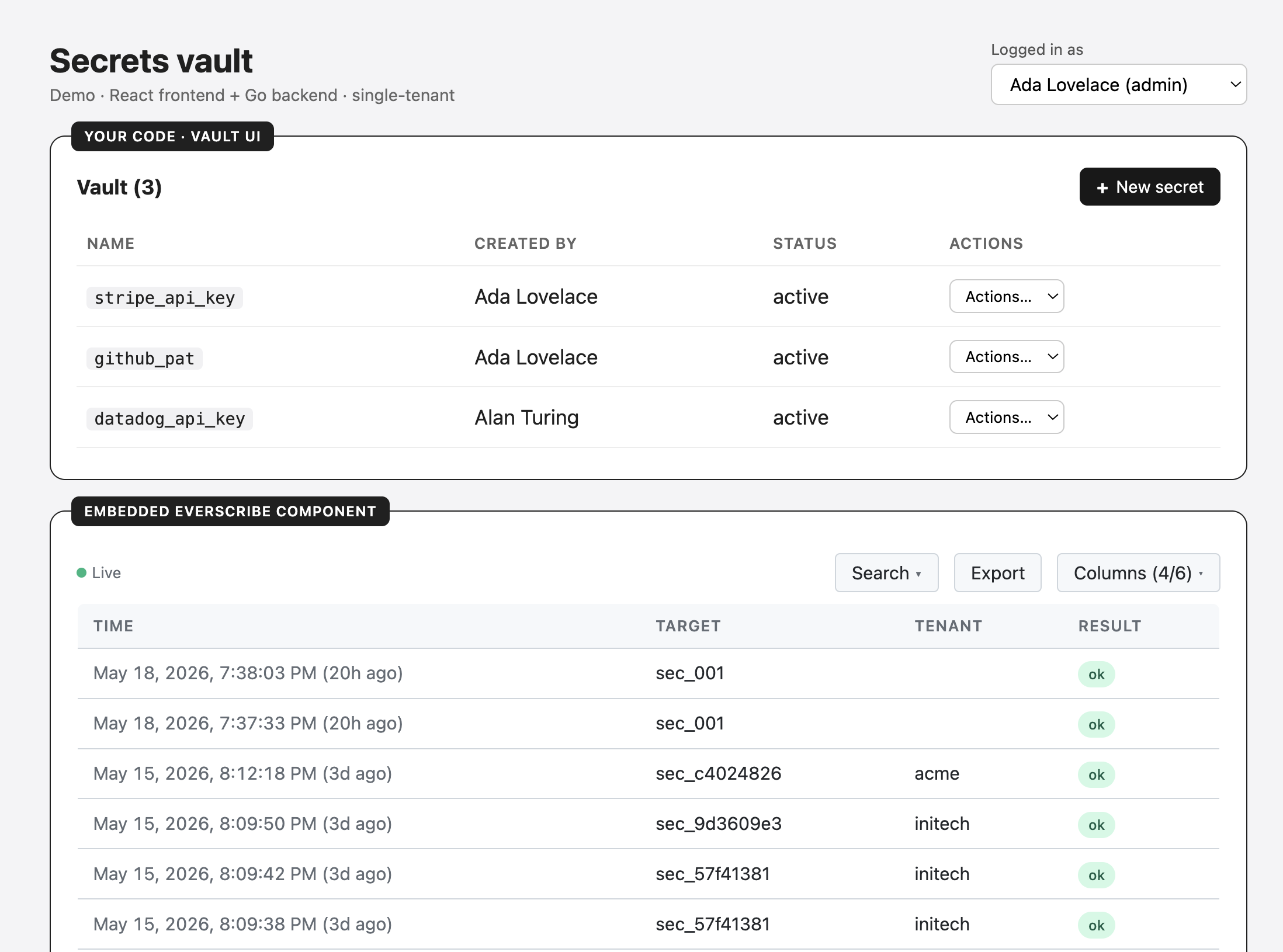
Use this when your project has one customer per project, or when you're embedding the UI in your own internal tooling. The token has no tenant_id claim, so the embed shows every event in the project.
Register the mint route for POST. The component POSTs tokenEndpoint with no body, so a GET-only route answers 405 and the embed never gets a token. Minting issues a bearer credential and consumes quota, so it is not a safe idempotent read, and a POST response is not cached without an explicit opt-in. Set Cache-Control: no-store on the response anyway, as defense in depth: a handler that also answers GET, or a proxy configured to cache POSTs, puts a per-user tenant-scoped token back in a shared cache.
The code below is the backend half. Construct the minter at boot, then mint per request:
package main

import (
    "encoding/json"
    "log"
    "net/http"
    "os"
    "time"

    everscribe "github.com/everscribe/sdk-go"
    "github.com/everscribe/sdk-go/pkg/minter"
)

func main() {
    // Construct the minter once at boot, reuse it across every request.
    es, err := everscribe.New(
        os.Getenv("EVERSCRIBE_PROJECT_ID"),
        os.Getenv("EVERSCRIBE_API_KEY"),
    )
    if err != nil {
        log.Fatal(err)
    }
    m := es.NewMinter()

    http.HandleFunc("POST /api/embed-token", mintSingleTenantTokenHandler(m))
    log.Fatal(http.ListenAndServe(":8080", nil))
}

func mintSingleTenantTokenHandler(m *minter.Client) http.HandlerFunc {
    return func(w http.ResponseWriter, r *http.Request) {
        if _, err := authenticate(r); err != nil {
            http.Error(w, "unauthorized", http.StatusUnauthorized)
            return
        }

        token, err := m.MintToken(r.Context(), minter.TokenOptions{
            // No TenantID — the project has one customer (or is internal),
            // so the token doesn't need to filter by tenant. The embed
            // shows every event in the project.
            ExpiresIn:      time.Hour,
        })
        if err != nil {
            http.Error(w, "mint failed", http.StatusInternalServerError)
            return
        }
        // Never let a proxy or CDN cache a per-user token.
        w.Header().Set("Cache-Control", "no-store")
        json.NewEncoder(w).Encode(map[string]string{"token": token})
    }
}
import express from "express";
import { create } from "@everscribe/sdk-node";

// Construct the minter once at boot, reuse it across every request.
const es = create(
    process.env.EVERSCRIBE_PROJECT_ID!,
    process.env.EVERSCRIBE_API_KEY!,
);
const m = es.newMinter();

const app = express();

app.post("/api/embed-token", async (req, res) => {
    const user = await authenticate(req);
    if (!user) {
        res.status(401).send("unauthorized");
        return;
    }

    try {
        const token = await m.mintToken({
            expiresIn: 60 * 60 * 1000, // 1 hour, in ms
        });
        // Never let a proxy or CDN cache a per-user token.
        res.set("Cache-Control", "no-store");
        res.json({ token });
    } catch {
        res.status(500).send("mint failed");
    }
});

app.listen(3000);
import os

from everscribe import minter
from everscribe.minter import TokenOptions
from fastapi import FastAPI, Request
from fastapi.responses import JSONResponse, PlainTextResponse

# Construct the minter once at boot, reuse it across every request.
m = minter.Client(
    os.environ["EVERSCRIBE_PROJECT_ID"],
    os.environ["EVERSCRIBE_API_KEY"],
)

app = FastAPI()


@app.post("/api/embed-token")
async def embed_token(request: Request):
    user = await authenticate(request)
    if user is None:
        return PlainTextResponse("unauthorized", status_code=401)

    try:
        token = m.mint_token(TokenOptions(
            # No tenant_id - the project has one customer (or is internal),
            # so the token doesn't need to filter by tenant. The embed
            # shows every event in the project.
            expires_in=60 * 60,  # 1 hour, in seconds
        ))
        # Never let a proxy or CDN cache a per-user token.
        return JSONResponse(
            {"token": token},
            headers={"Cache-Control": "no-store"},
        )
    except Exception:
        return PlainTextResponse("mint failed", status_code=500)
use axum::{
    extract::State,
    http::{header, HeaderMap, StatusCode},
    response::IntoResponse,
    routing::post,
    Json, Router,
};
use everscribe::minter::{self, TokenOptions};
use serde_json::json;
use std::{sync::Arc, time::Duration};

#[tokio::main]
async fn main() {
    // Construct the minter once at boot, share it across every request.
    let m = Arc::new(minter::Client::new(
        std::env::var("EVERSCRIBE_PROJECT_ID").unwrap(),
        std::env::var("EVERSCRIBE_API_KEY").unwrap(),
        Default::default(),
    ));

    let app = Router::new()
        .route("/api/embed-token", post(mint_single_tenant))
        .with_state(m);

    let listener = tokio::net::TcpListener::bind("0.0.0.0:8080").await.unwrap();
    axum::serve(listener, app).await.unwrap();
}

async fn mint_single_tenant(
    State(m): State<Arc<minter::Client>>,
    headers: HeaderMap,
) -> impl IntoResponse {
    if authenticate(&headers).await.is_none() {
        return (StatusCode::UNAUTHORIZED, "unauthorized").into_response();
    }

    match m
        .mint_token(&TokenOptions {
            // No tenant_id - the project has one customer (or is internal),
            // so the token doesn't need to filter by tenant.
            expires_in: Duration::from_secs(60 * 60),
            ..Default::default()
        })
        .await
    {
        // Never let a proxy or CDN cache a per-user token.
        Ok(token) => (
            [(header::CACHE_CONTROL, "no-store")],
            Json(json!({ "token": token })),
        )
            .into_response(),
        Err(_) => (StatusCode::INTERNAL_SERVER_ERROR, "mint failed").into_response(),
    }
}
Screenshot is from the single-tenant React + Go full-stack example.
Multi-tenant minting
Use this when your project partitions events by tenant_id and each customer should only see their own. Mint a token whose TenantID matches the signed-in user's tenant. The server enforces the scope on every read. Your code can't accidentally show one tenant's data to another even if the JS gets mixed up.
Same minter construction as the single-tenant case. What changes is the TenantID claim per request:
package main

import (
    "encoding/json"
    "log"
    "net/http"
    "os"
    "time"

    everscribe "github.com/everscribe/sdk-go"
    "github.com/everscribe/sdk-go/pkg/minter"
)

func main() {
    es, err := everscribe.New(
        os.Getenv("EVERSCRIBE_PROJECT_ID"),
        os.Getenv("EVERSCRIBE_API_KEY"),
    )
    if err != nil {
        log.Fatal(err)
    }
    m := es.NewMinter()

    http.HandleFunc("POST /api/embed-token", mintMultiTenantTokenHandler(m))
    log.Fatal(http.ListenAndServe(":8080", nil))
}

func mintMultiTenantTokenHandler(m *minter.Client) http.HandlerFunc {
    return func(w http.ResponseWriter, r *http.Request) {
        user, err := authenticate(r)
        if err != nil {
            http.Error(w, "unauthorized", http.StatusUnauthorized)
            return
        }

        token, err := m.MintToken(r.Context(), minter.TokenOptions{
            TenantID:       user.TenantID,
            ExpiresIn:      time.Hour,
        })
        if err != nil {
            http.Error(w, "mint failed", http.StatusInternalServerError)
            return
        }
        // Never let a proxy or CDN cache a per-user token.
        w.Header().Set("Cache-Control", "no-store")
        json.NewEncoder(w).Encode(map[string]string{"token": token})
    }
}
import express from "express";
import { create } from "@everscribe/sdk-node";

const es = create(
    process.env.EVERSCRIBE_PROJECT_ID!,
    process.env.EVERSCRIBE_API_KEY!,
);
const m = es.newMinter();

const app = express();

app.post("/api/embed-token", async (req, res) => {
    const user = await authenticate(req);
    if (!user) {
        res.status(401).send("unauthorized");
        return;
    }

    try {
        const token = await m.mintToken({
            tenantId: user.tenantId,
            expiresIn: 60 * 60 * 1000,
        });
        // Never let a proxy or CDN cache a per-user token.
        res.set("Cache-Control", "no-store");
        res.json({ token });
    } catch {
        res.status(500).send("mint failed");
    }
});

app.listen(3000);
import os

from everscribe import minter
from everscribe.minter import TokenOptions
from fastapi import FastAPI, Request
from fastapi.responses import JSONResponse, PlainTextResponse

m = minter.Client(
    os.environ["EVERSCRIBE_PROJECT_ID"],
    os.environ["EVERSCRIBE_API_KEY"],
)

app = FastAPI()


@app.post("/api/embed-token")
async def embed_token(request: Request):
    user = await authenticate(request)
    if user is None:
        return PlainTextResponse("unauthorized", status_code=401)

    try:
        token = m.mint_token(TokenOptions(
            # tenant_id set to the signed-in user's tenant - reads are
            # filtered server-side. For an admin view, use the same minter
            # but omit tenant_id.
            tenant_id=user.tenant_id,
            expires_in=60 * 60,
        ))
        # Never let a proxy or CDN cache a per-user token.
        return JSONResponse(
            {"token": token},
            headers={"Cache-Control": "no-store"},
        )
    except Exception:
        return PlainTextResponse("mint failed", status_code=500)
use axum::{
    extract::State,
    http::{header, HeaderMap, StatusCode},
    response::IntoResponse,
    routing::post,
    Json, Router,
};
use everscribe::minter::{self, TokenOptions};
use serde_json::json;
use std::{sync::Arc, time::Duration};

#[tokio::main]
async fn main() {
    let m = Arc::new(minter::Client::new(
        std::env::var("EVERSCRIBE_PROJECT_ID").unwrap(),
        std::env::var("EVERSCRIBE_API_KEY").unwrap(),
        Default::default(),
    ));

    let app = Router::new()
        .route("/api/embed-token", post(mint_multi_tenant))
        .with_state(m);

    let listener = tokio::net::TcpListener::bind("0.0.0.0:8080").await.unwrap();
    axum::serve(listener, app).await.unwrap();
}

async fn mint_multi_tenant(
    State(m): State<Arc<minter::Client>>,
    headers: HeaderMap,
) -> impl IntoResponse {
    let user = match authenticate(&headers).await {
        Some(user) => user,
        None => return (StatusCode::UNAUTHORIZED, "unauthorized").into_response(),
    };

    match m
        .mint_token(&TokenOptions {
            // tenant_id set to the signed-in user's tenant - reads are
            // filtered server-side. For an admin view, omit tenant_id.
            tenant_id: user.tenant_id,
            expires_in: Duration::from_secs(60 * 60),
            ..Default::default()
        })
        .await
    {
        // Never let a proxy or CDN cache a per-user token.
        Ok(token) => (
            [(header::CACHE_CONTROL, "no-store")],
            Json(json!({ "token": token })),
        )
            .into_response(),
        Err(_) => (StatusCode::INTERNAL_SERVER_ERROR, "mint failed").into_response(),
    }
}
Screenshot from the multi-tenant React + Go full-stack example.
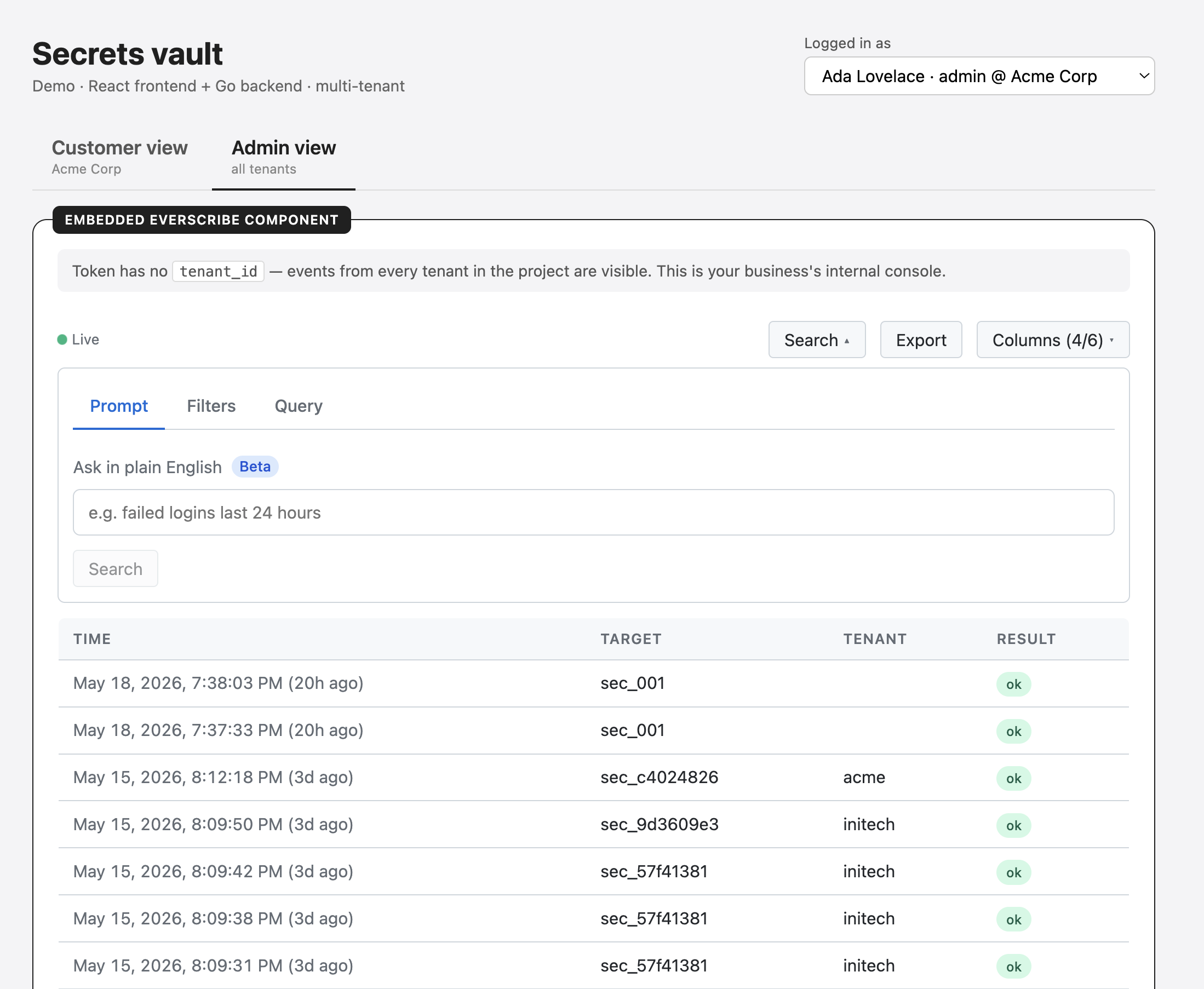
Multi-tenant products often expose two mint endpoints:
| Endpoint | Token | Used for |
|---|---|---|
/api/embed-token/customer |
TenantID = signed-in user's tenant |
the customer's view of their own audit trail |
/api/embed-token/admin |
TenantID omitted |
internal admin / support tool, shows every tenant |
Same minter, different scoping rules. Both endpoints sit behind your normal authentication; the type of authenticated user determines which one the frontend calls.
Token options
Every option you pass when minting becomes a JWT claim the server enforces on every read. Omitting a field means "no restriction on that dimension."
| Option (Go / Node) | JWT claim | Type | Default | Notes |
|---|---|---|---|---|
TenantID / tenantId |
tenant_id |
string | unset | Hard-scopes reads to events with this tenant_id. Omit for unscoped (single-tenant or admin view). Trimmed; rejected if empty after trim or > 256 chars. |
ExpiresIn / expiresIn |
exp |
time.Duration / ms number |
server default (1 h) | Token lifetime. Server clamps to [60 s, 24 h]. Zero / omit uses the server default. |
AllowedColumns / allowedColumns |
columns |
[]string |
unset | Whitelist of Event JSON field names (snake_case. occurred_at, actor, target, etc.). Omit for no column restriction. Empty slice is rejected. |
AllowedActions / allowedActions |
actions |
[]string |
unset | Exact match (user.login) or suffix wildcard (user.*). Bare *, prefix wildcards, and wildcards without a preceding dot are rejected. Omit for no action restriction. Empty slice is rejected. |
AllowDSLInput / allowDslInput |
allow_dsl_input |
bool | false |
When true, the embed's Query tab is shown and ?q= reads are accepted. When false, the tab hides and the endpoint refuses query strings. |
AllowNLP / allowNlp |
allow_nlp |
bool | false |
When true, the embed's Prompt tab is shown and the NLP endpoint accepts requests for this token. When false, the tab hides and the endpoint returns 403. |
If you want to validate option values before calling mintToken, the Node SDK exports MIN_EXPIRES_IN_MS, MAX_EXPIRES_IN_MS, and ALLOWED_COLUMNS constants. The Go SDK accepts the same values via the minter.TokenOptions struct fields above. See the minter references for Go, Node, Python, and Rust for full SDK details.
Token refresh
On a 401, the component falls through this chain:
- If
onTokenExpiredis set. Call it, swap the returned token, retry. - Else if
tokenEndpointis set. POST to it withcredentials: 'include'and no body, expect{ token }, retry. - Otherwise. Render a "Session expired" state.
If your token endpoint uses the same session-cookie auth as the rest of your app, refresh is silent.
Embed secret rotation
The signing secret is per-project and distinct from your project API key. Rotation is a one-click operation in the project's settings:
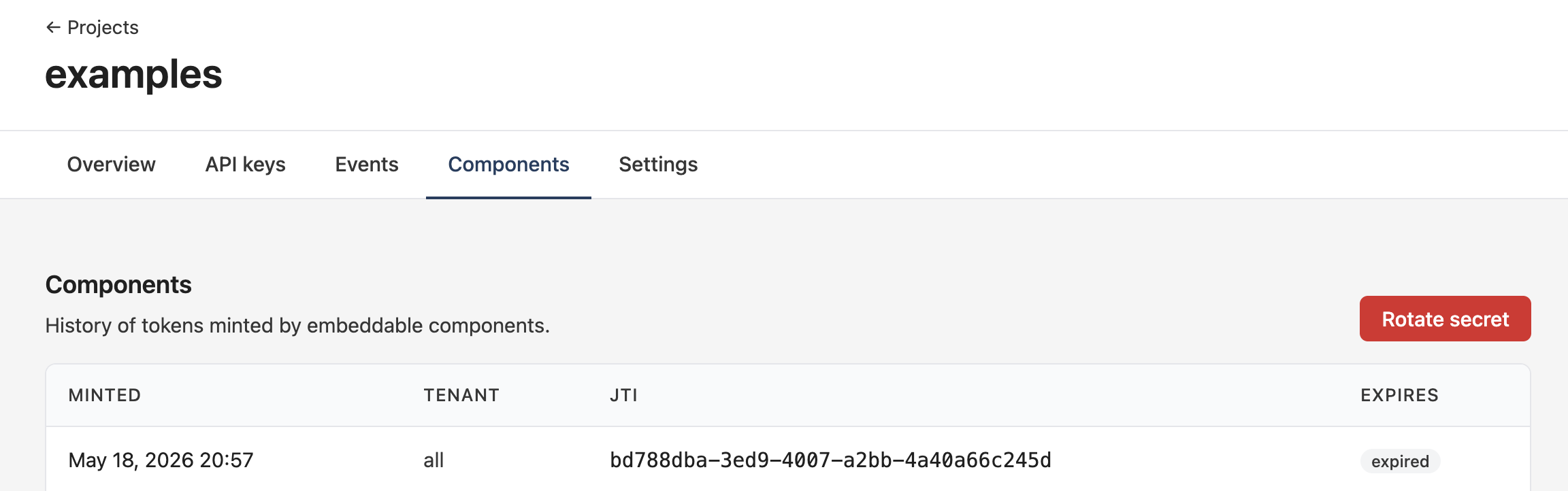
Useful when:
- The secret might have leaked (a stolen backend image, a compromised CI artifact)
- A team member with access to the secret leaves and you don't have separate signing roles
- On a routine schedule, the same way you'd rotate any other long-lived credential
After rotation, previously-minted tokens stop verifying. Given typical TTLs that's a small blip. Current page loads error out and the refresh chain mints a new token against the new secret.
What next
Once your backend can mint a token, pick the package your frontend uses and wire the tokenEndpoint (React, Vanilla) or token-endpoint (custom element) attribute to your mint route:
- React
- Svelte
- Vanilla JS, Vue, Solid, Angular
- Core. For custom UI built on the data layer
- Styles. For theming the default look